Flying, classes and a ball all take place in the same magic academy, turning a multi-scene capability showcase into a fairy-tale journey you want to keep watching.
Project Type
Science & Tech
Client
Jimeng AI
Year
2025
Our role
Showcase concept, AI visuals & editing
Original format
1906 × 1080 · 00:37
Film00:37 · Film
01 / Background
Fitting a Capability Showcase into One World
In June 2025, ahead of the official launch of its new video model Dreamina 3.0 Pro, Dreamina AI asked us to make a capability showcase focused on animation style, character motion and magical transformations. The idea began with “going to magic school” and grew into a tour of a magical world: broomstick flight, a potions class, spellcasting, a plant concert, a flying carriage, a ball and a garden. Each scene has one thing you understand at a glance, and a single fairy-tale world ties them together.
The characters and architecture look like an animated feature, and the pink-purple and blue-gold palette with soft lighting keeps the fairy-tale feel. Each scene shows something different, but all of them revolve around learning and life at the academy.
02 / Creative Highlights
Letting Every Change Happen in the Same Magic Academy
01
One World, Many Different Scenes
The castle, classroom, forest, ballroom and garden are all different places, linked by the same materials, light colors and fairy-tale designs. That gives the showcase a coherent theme, and viewers don't have to readjust to a new look at every scene change.
02
Tying Magic to Concrete Actions
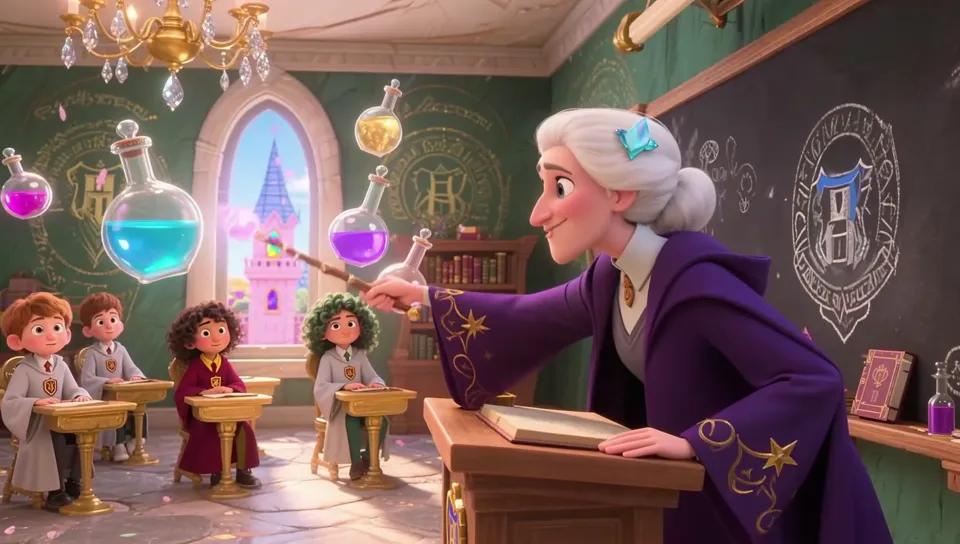
A teacher raises her wand and a floating blue potion bottle flies into the foreground; a student swings his wand and a glowing ring spreads around his body. The character's action and the change in the prop appear in the same shot, so you can see where the magic starts and what it creates.
03
Music Drawn as Lines in Space
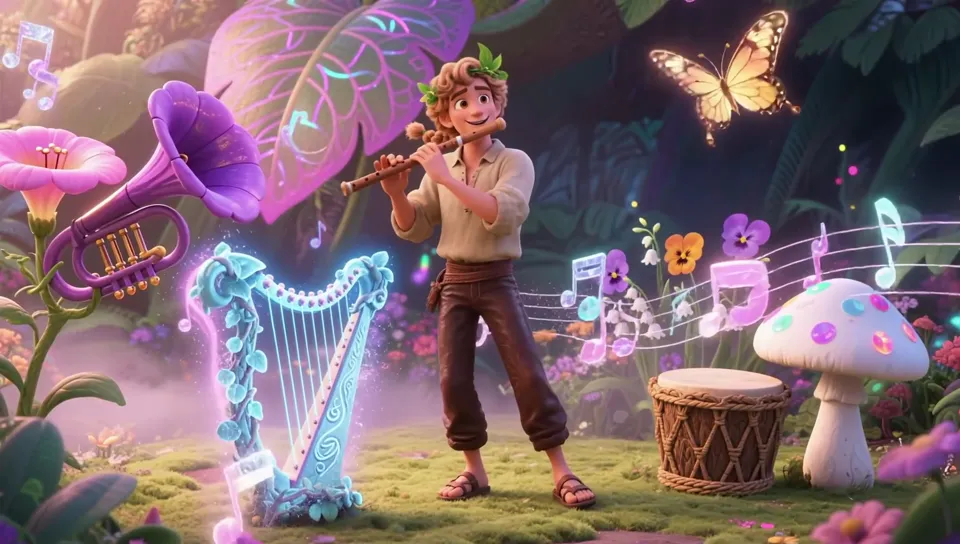
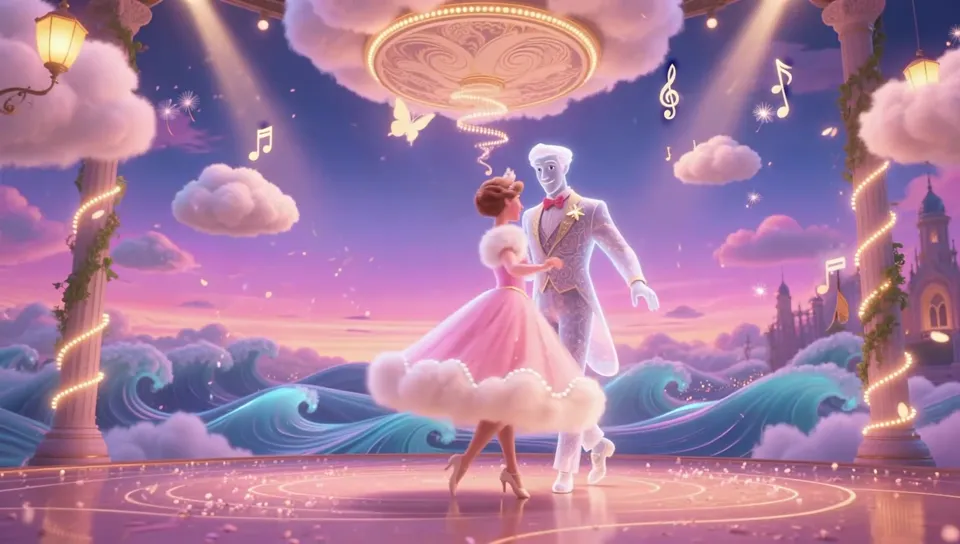
In the forest performance, glowing notes weave between the instruments and mushrooms; at the ball, a golden musical staff coils above the two dancers. The same musical elements show up in different places, giving the music a visible path of motion and linking the forest concert to the ball.
04
A Blossoming Tree as the Lasting Final Image
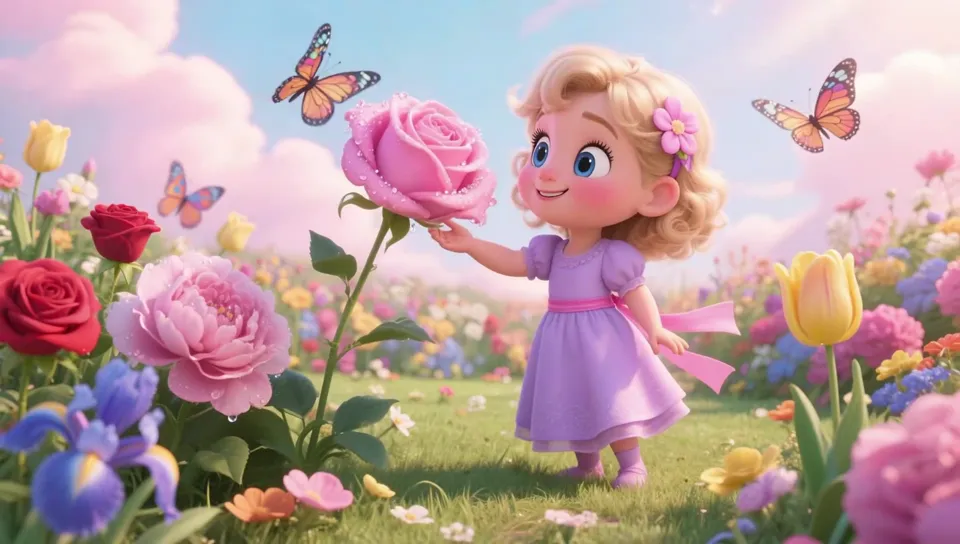
In the garden, a little girl reaches out and touches a pink rose; it bursts with pink light and in moments grows into a lush flowering tree. A single small flower becomes the star of the whole frame. The flowering tree, butterflies and foreground blossoms are bright and light, giving the string of scenes a clear ending.
03 / Scene Breakdown
A Journey of Arrival, Learning and Celebration
Film · 00:00–00:09
Flying into the Academy, Stepping into Class
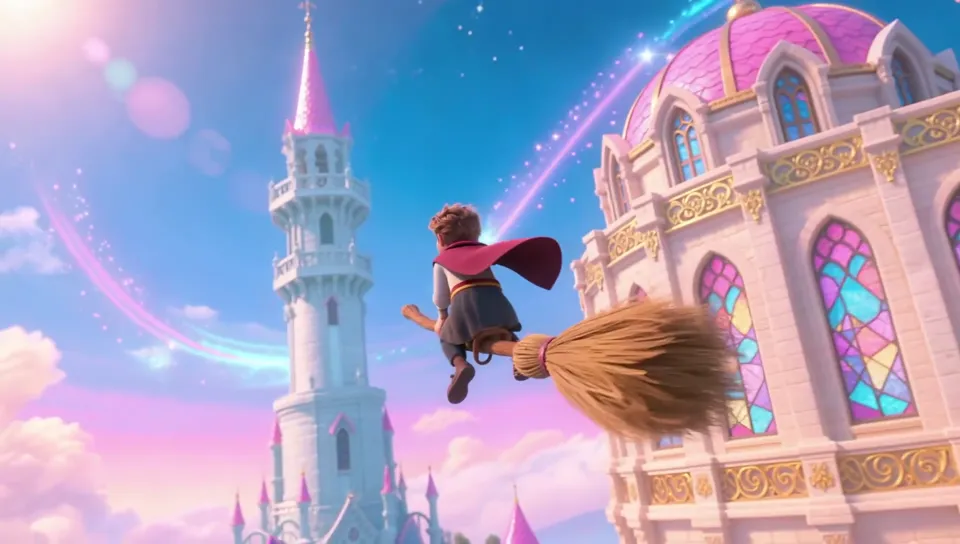
A boy flies on a broomstick around the academy's white tower as the camera chases close behind him, revealing the whole pink-and-blue castle; then we cut into the potions class, where the teacher uses her wand to send a blue bottle toward the camera.
Clip · 00:00–00:04
Broomstick Flight Around the Tower
The camera stays right behind the boy, his cape and broom bristles blown by the wind as the white tower and castle sweep past, finally revealing the whole academy in the distance.
Clip · 00:04–00:08
A Potion Bottle Flies Right Up to You
The teacher raises her wand, and a blue bottle hanging in midair slowly drifts toward the camera; the camera turns to the class, where several students watch it fly by, wide-eyed.
Film · 00:09–00:17
Spellcasting and Music
In the great hall, a student in a pointed hat swings his wand and a ring of light spins around him before the camera pushes into a close-up of his face; then we move to the forest, where morning glories, a harp and mushroom drums all “play” alongside a flute player.
Clip · 00:09–00:13
A Wand Draws a Ring of Light
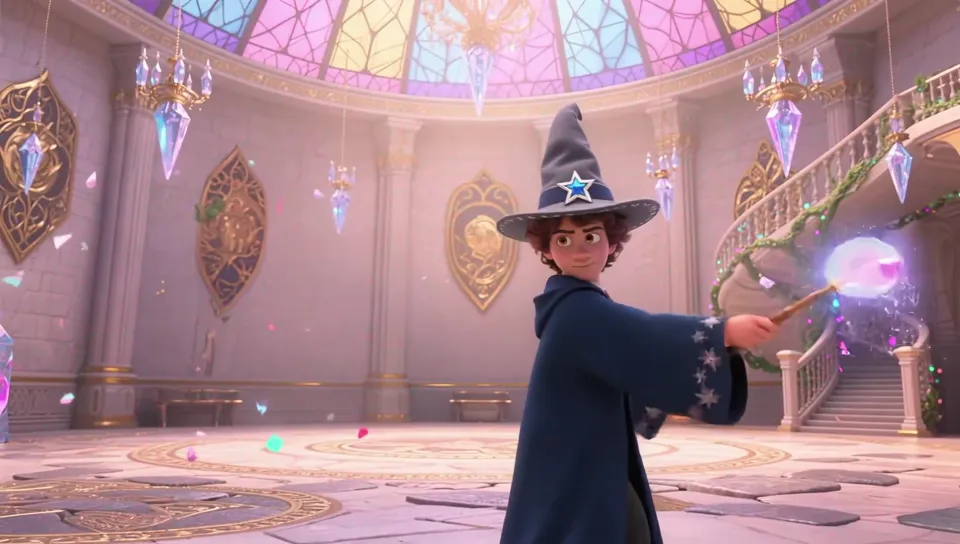
The student swings hard, and the wand tip pulls out a band of light carved with runes that wraps around his body into a ring; within the same generation, the camera cuts straight from a wide shot to a close-up of his face.
Clip · 00:13–00:17
The Plant Band in the Forest
The musician plays a wooden flute as glowing notes float from the instrument, curling around the harp and mushrooms; golden butterflies flutter among the leaves.
Film · 00:17–00:26
A Parade in the Clouds and a Ball
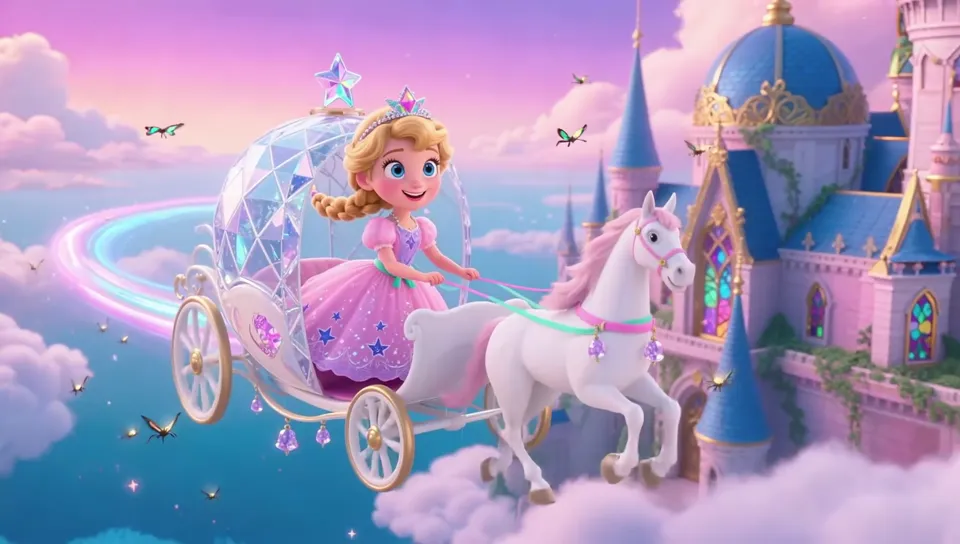
A little princess rides a crystal carriage past a castle in the clouds, trailing a rainbow streak of light; next comes a dance floor in the clouds, where two dancers take hands and a golden musical staff slowly circles above them.
Clip · 00:17–00:22
Crystal Carriage Past the Castle
White horses pull the crystal carriage across the clouds, the princess looks back with a smile, the light trail behind the carriage curves into an arc, and butterflies fly all around.
Clip · 00:22–00:26
Ball in the Clouds
A princess in a pink dress twirls hand in hand with a translucent “cloud gentleman” against billowing clouds; as they dance, a glowing musical staff unfolds above their heads.
Film · 00:26–00:37
Animals and the Garden
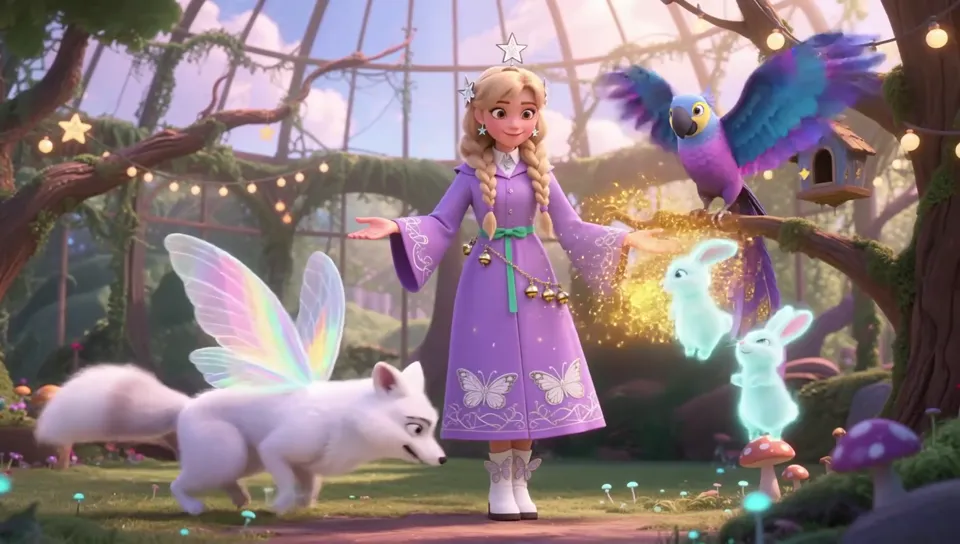
In a greenhouse, a student summons golden specks of light, and a white fox, a glowing bunny and a parrot gather around her; finally, in the garden, a little girl touches a pink rose and it grows into a flowering tree. The end card shows the Dreamina AI logo and the line “This video was generated with Dreamina AI 3.0 Pro.”
Clip · 00:26–00:30
Summoning Magical Animals
Golden light glows in the student's palm, a white fox with rainbow wings walks up, a bunny hops at her feet, and a parrot flaps over to land on her shoulder.
Clip · 00:30–00:34
A Rose Grows into a Flowering Tree
The little girl touches a dew-covered pink rose; it bursts with pink light and in moments grows into a pink flowering tree. She watches open-mouthed as butterflies flutter past.
04 / Storyboards & Final Frames
The final stills for all eight shots.
In the order of the final film. Each of the 8 shots has one final still, which locks in the characters, costumes, props and setting; each image below is the starting frame of its shot, animated with Dreamina 3.0 Pro image-to-video.
01
Academy and Classroom
In the film · 00:00–00:13
Shot 1.1
Flying Broomstick
A boy on a broomstick circles the pink-and-blue academy, with the camera chasing right behind him around the white tower to reveal the whole academy.
Flying Broomstick · Final 1
Shot 1.2
Magic Classroom
A silver-haired teacher, floating colorful potion bottles and the students below. In the film, the camera pushes from a wide shot to a medium shot, then cuts to a close shot of the students and a close-up of a bottle.
Magic Classroom · Final 1
Shot 1.3
Casting a Spell
A student in a pointed hat casts a spell in the great hall; the camera goes from a wide shot to the wand swing, then cuts to an orbiting close-up of his face.
Casting a Spell · Final 1
02
Music and Parade
In the film · 00:13–00:26
Shot 2.1
Plant Concert
A flute player in the forest, surrounded by morning glory trumpets, a vine harp and mushroom drums, with notes turning into glowing lines that float in the air.
Plant Concert · Final 1
Shot 2.2
Flying Carriage
The “tour” section: a little princess flies above the castle in a crystal carriage, trailing a blue-violet streak of light.
Flying Carriage · Final 1
Shot 2.3
Cloud Ball
A princess in a pink dress dances with a translucent cloud partner on a dance floor in the clouds, with notes and a musical staff swirling around them.
Cloud Ball · Final 1
03
Animals and the Garden
In the film · 00:26–00:34
Shot 3.1
Magical Animals
In the greenhouse, a student summons a white fox with rainbow wings, a glowing bunny and a parrot, showing people and animals interacting in the same frame.
Magical Animals · Final 1
Shot 3.2
A Flower Becomes a Tree
A little girl touches a dew-covered pink rose, which bursts with pink light and grows into a big tree, closing the film.
A Flower Becomes a Tree · Final 1
05 / Results
Dreamina 3.0 Pro Visual Showcase
For Dreamina AI we delivered a 37-second 16:9 film, a landscape title cover and an end card with the Dreamina AI logo, about a day and a half from receiving the materials to delivery. All images and video for the 8 shots were generated in Dreamina, and the end card states “This video was generated with Dreamina AI 3.0 Pro.”
Case Study
Liandan AI Studio × Dreamina AI | A Tour of a Magic Academy in a Day and a Half
In June 2025, as Dreamina AI prepared to officially launch its new video model Dreamina 3.0 Pro, it asked us to make a short film showcasing what the model could do.
The brief was simple: at least 30 seconds, and make it clear what the new model does well. The timeline was tight: about a day and a half from receiving the materials to delivery.
What we delivered was a 37-second fairy tale: a broomstick flight into a magic academy, classes, spellcasting, music, a carriage ride, a ball in the clouds, and finally a rose in the garden growing into a tree.
Client
Dreamina AI
Project Type
New Model Capability Showcase (3D Animation Style)
Timeline
June 2025, completed in about a day and a half
Deliverables
37-second 16:9 film (1906×1080), landscape title cover, end card with the Dreamina AI logo
Purpose
Social media promotion for the Dreamina 3.0 Pro launch
Produced by
Shenzhen Alchemy Technology Co., Ltd. (Liandan AI Studio)
01
Test First, Then Decide How to Shoot
Dreamina's materials listed several strengths of 3.0 Pro: image-to-video doesn't freeze up; people and animals move naturally; cartoon and animation styles stay consistent from start to finish; and in complex actions where people touch props, the subject is less likely to warp.
We didn't jump straight into production. We first tried text-to-video in several styles, including realistic racing and sci-fi. Realistic scenes held up well, and the cartoon style already had the feel of an animated feature.
But in a showcase, every shot's character design, costume and props have to follow the plan. So we settled on this: use Dreamina image generation to lock each shot's frame, then bring it to life with 3.0 Pro image-to-video. Every image and video in the film was made in Dreamina.
02
Theme: Off to Magic School After the College Entrance Exam
The project landed right after the gaokao, China's college entrance exam, so we came up with a lighthearted idea: going to a magic academy to learn magic.
Magic naturally fits what 3.0 Pro does well: swinging a wand is a big body movement, a floating potion bottle is interaction between a person and a prop, small animals gathering around put people and animals in the same frame, and the whole film shares one 3D animation style.
We set ourselves one rule: the point isn't storytelling; every shot needs a dazzling magic action you understand at a glance, and the story is just there to string the images together.
At first we only planned a “magic classroom.” After a few shots, we realized a classroom couldn't hold enough variety, so we expanded the idea into a “journey through a magical world”: adding a flying carriage, interaction with small animals, a plant concert and a ball in the clouds.
The original “magic classroom”: teacher, potion bottles and studentsThe flying carriage added after expanding into the “journey”
03
Lock the Frame of Every Shot First
For each of the 8 shots we first wrote a very detailed image description: the class teacher has long silver-white hair, a purple robe with gold star patterns on the cuffs, and a wand topped with a pink crystal; the potion bottles come in indigo, pink-purple and gilded gold, with different-colored smoke rising from their necks.
Once the stills were set, we wrote the video prompts, second by second: 0–3 seconds, a wide push-in; 3–6 seconds, the teacher swings her wand; 6–8 seconds, cut to a close shot of the students; 8–10 seconds, orbit around the potion bottle.
So the classroom in the film isn't a stiff locked-off shot: the teacher raises her hand, the bottle drifts from mid-ground up to the camera, and we also see the students' reactions.
Clip · 00:04–00:08
A Potion Bottle Flies Right Up to You
The teacher raises her wand, the blue bottle drifts toward the camera, and the students watch wide-eyed.
04
Making Full Use of Camera Moves and Cuts
The first shot is the broomstick flight. The 5-second version looked good, but we felt the camera move could be bigger, so we reran it at 10 seconds, with the camera chasing close behind the boy as he circles the white tower.
3.0 Pro has another handy feature: one prompt can include several camera cuts, so a single generation can go from a wide shot to a close-up. That's how we wrote the spellcasting shot: first a wide shot as the student raises his wand and swings, then a cut to a close-up of his face as the band of light sweeps past.
Clip · 00:09–00:13
A Wand Draws a Ring of Light
Within one generation, the shot cuts from the wide wand swing to a close-up of the face.
Most shots were generated at 10 seconds, and only the best 4 seconds or so made it into the final cut. Strung together, the 8 scenes keep new places and new magic coming throughout the 37 seconds.
05
What this project achieved
The easiest trap with a model showcase is ending up with a pile of unrelated “effect tests” stitched together.
We used one magic academy to put them all in the same world: the same pink-purple and blue-gold palette, the same 3D animation style. Flying, the classroom, spellcasting, music, the ball, animals and the garden each show one capability, yet viewers simply feel they're watching a fairy tale.
The first frame carries the landscape title “Dreamina AI: A Journey Through the Magical World,” and we made a matching landscape cover in the same style; the end card shows the Dreamina AI logo with the line “This video was generated with Dreamina AI 3.0 Pro.” Viewers know what they've watched and what it was made with.
Clip · 00:30–00:34
A Rose Grows into a Flowering Tree
A pink rose bursts with pink light and grows into a flowering tree, where the film ends.
FAQ
FAQ
How long does it take to make a product capability showcase with AI, from brief to delivery?
This project took about a day and a half: on day one, after receiving the materials, we tested styles and chose the theme, then produced the stills and video for all 8 shots; on the morning of day two we cut a first draft with music, added the end card and landscape cover based on feedback, and delivered the 37-second film that afternoon.
How do you keep the style consistent in a cartoon-style AI short?
Use one shared style description (3D animated feature style, pink-purple and blue-gold palette) to create a final still for every shot, locking in characters, costumes, props and settings, then generate video from those images. All 8 shots in this film were made this way, with both images and video created in Dreamina.
How many scenes can a 30-something-second short hold?
This 37-second film holds 8 shots: broomstick flight, the magic classroom, spellcasting, the plant concert, the flying carriage, the ball in the clouds, magical animals and the garden. Most shots were generated at 10 seconds, with only the best 4 seconds or so kept in the final cut.
What did this project deliver?
A 37-second 16:9 landscape film (1906×1080), a landscape title cover matching the film's style, and an end card with the Dreamina AI logo and the line “This video was generated with Dreamina AI 3.0 Pro.”
Approach
One Thing per Scene, Laid Out in Order
Every shot was first generated as an image in Dreamina, then turned into video from that image. The storyboard locked in costumes, architecture and props first, then laid out the tracking broomstick flight, the changing shot sizes in class, the spell ring, the animal interaction and the flowering-tree transformation, so every action in every scene has a concrete object.
Each character's action leads into the magic effect: in the classroom, a bottle flies forward, creating depth between the characters and the space; a circular spell spreads around the caster; lines of music appear with the playing and dancing; and the flowering tree keeps growing until it fills the whole setting. Every section has one thing you can follow, which gives the scene changes their rhythm.
The scenes extend from the classroom out across the whole magical world, with the flying carriage, plant concert, cloud ball and animal interaction keeping the locations changing. The film opens with a landscape title that matches the style and ends with the Dreamina AI logo and the 3.0 Pro credit line; the brand bookends the film while the middle showcases the visuals, for a complete structure.